
Turbulent Flow in a curved pipe (3D)#
Goals of the tutorial:
Using a turbulence model in TrioCFD: RANS or LES
Using a periodic box to obtain a developed turbulent flow for inlet boundary conditions
Using TrioCFD’s parallel capabilities
Figure 7 shows the geometry of the test case you will run in this tutorial. Figure 8 shows the inlet of the pipe, where the special periodic box computation will be used.
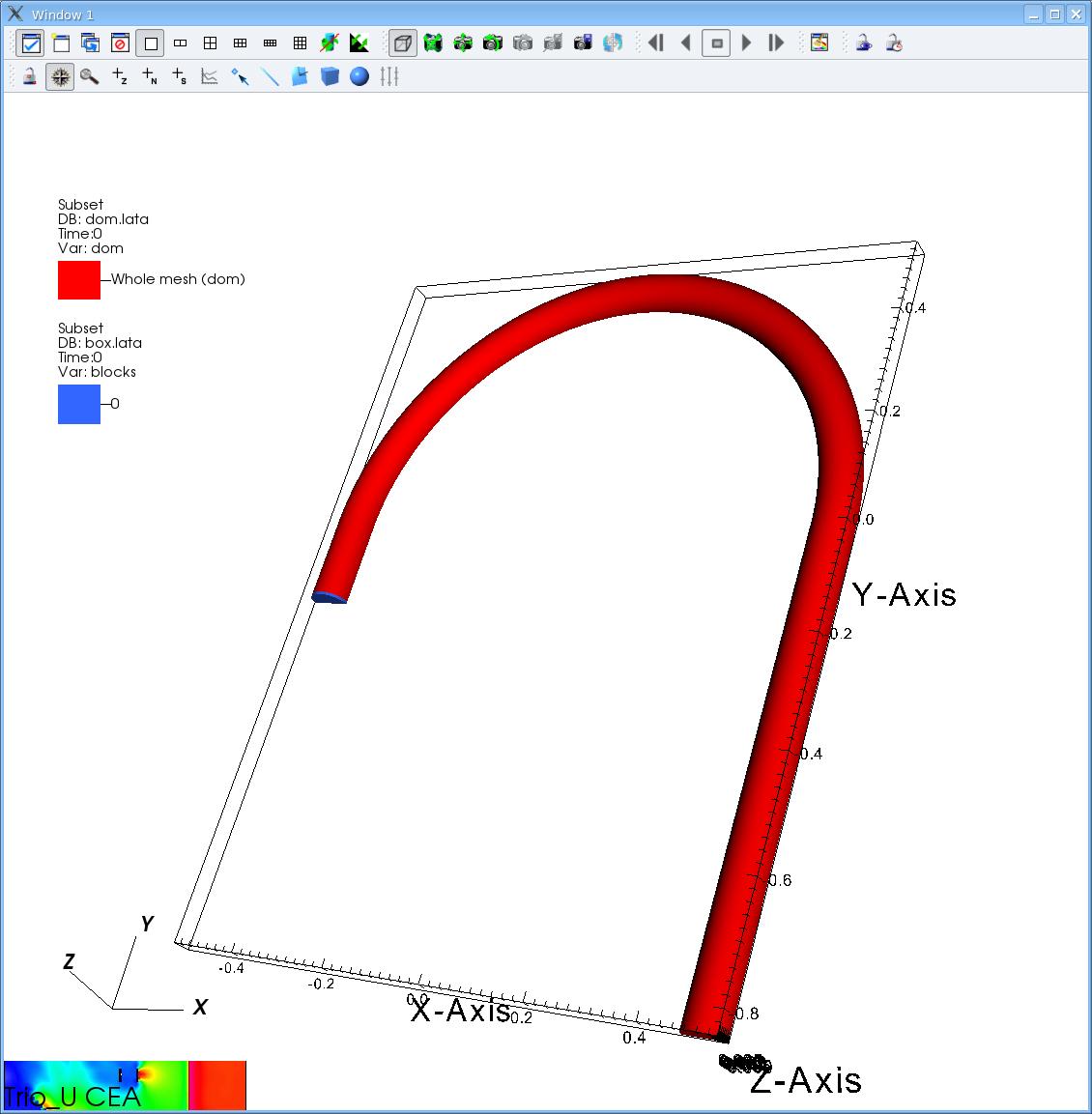
Figure 7 Geometry of the curved pipe#
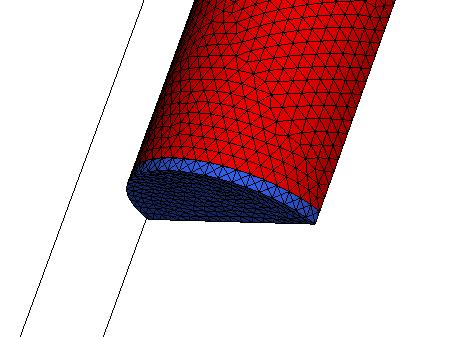
Figure 8 Zoom on the pipe inlet, with the periodic box in blue#
Preparation of the tutorial#
For this tutorial, start from an empty directory, e.g. TrioCFD_tutorial_curved_pipe and source the TrioCFD environment.
This tutorial will start from the validation form PeriodicBox. Use the following commands to copy this validation form:
mkdir -p PeriodicBox && cd PeriodicBox
cp ${TrioCFD_project_directory}/share/Validation/Rapports_automatiques/Turbulence/RANS/PeriodicBox/src/* .
You should now have serveral files in your PeriodicBox directory, including:
BuildMeshes.data: for generating the curved pipe and box meshesPeriodicBoxRANS.data: for running the RANS simulation in the periodic boxDomainFlowRANS.data: for running the RANS simulation in the pipe with inlet steady boundary conditionsPeriodicBoxLES.data: for running the LES simulation in the periodic boxDomainFlowLES.data: for running the LES simulation in the pipe with inlet unsteady boundary conditions
Generating the meshes#
Now you will generate the meshes. The pipe mesh is stored in an archive, simply decompress it using:
gunzip Tube_coude_463259.msh.gz
For the periodic box, the mesh will be generated by the tools provided by Trust. For this, run the BuildMeshes.data file with TrioCFD/TRUST:
triocfd BuildMeshes.data
This dataset will first partition the pipe mesh for 6 cpu parallel simulation, and then generate the periodic box mesh and partition it, making it usable with 2 to 6 cores.
You can look at the BuildMeshes.data and try to understand what each line do. The syntax is relatively straightforward.
Running the PeriodicBox simulations#
Before running, open the files PeriodicBoxRANS.data and PeriodicBoxLES.data and change the parameter nb_pas_dt_max to 100, to shorten the simulations. Running the full calculations may take up to a few hours.
Then, run the simulations in parallel with two processes:
triocfd PeriodicBoxRANS 2
triocfd PeriodicBoxLES 2
Running the pipe simulations#
Before running the simulations on the full pipe, take a look at the data sets for each simulation: DomainFlowRANS.data (resp. DomainFlowLES.data).
To better visualize the differences between the two, you can open/edit them via meld:
meld DomainFlowRANS.data DomainFlowLES.data &
First, change nb_pas_dt_max to 10 in both files, to shorten the calculations.
You can see that the data files contains two problems, one for the box (pb_box) and one for the pipe (pb_dom).
They will be coupled together, so that the pipe problem takes the output from the periodic box as its inlet boudary condition.
Notice that:
we use the last iteration of the previous calculation
PeriodicBoxXXXas an initial condition for the box problem (pb_box).This is done for the velocity field of the
Navier_Stokes_Turbulentequation and for the temperature of theConvection_Diffusion_Temperature_Turbulentequation.This initialization is done with the keyword
Champ_fonc_repriseininitial_conditions, and using the argumentlast_time(at the end of the line).last_timecan also be replaced by a specific time you want to use.
the special coupled boundary condition is done in
boundary_conditionsof the pipe problem (pb_dom) with the line:inlet frontiere_ouverte_temperature_imposee Champ_front_recyclage { pb_champ_evaluateur pb_box temperature 1 }most of the differences between the 2 datasets are in the definition of the turbulence models: k-espilon for the RANS simulation and WALE for the LES simulation, each having their own parameters.
Now, you can run the Pipe simulations:
triocfd DomainFlowRANS 6
triocfd DomainFlowLES 6
You can take a look at the result with visit. But using visit is out of the scope of this tutorial.